
Key Takeaways
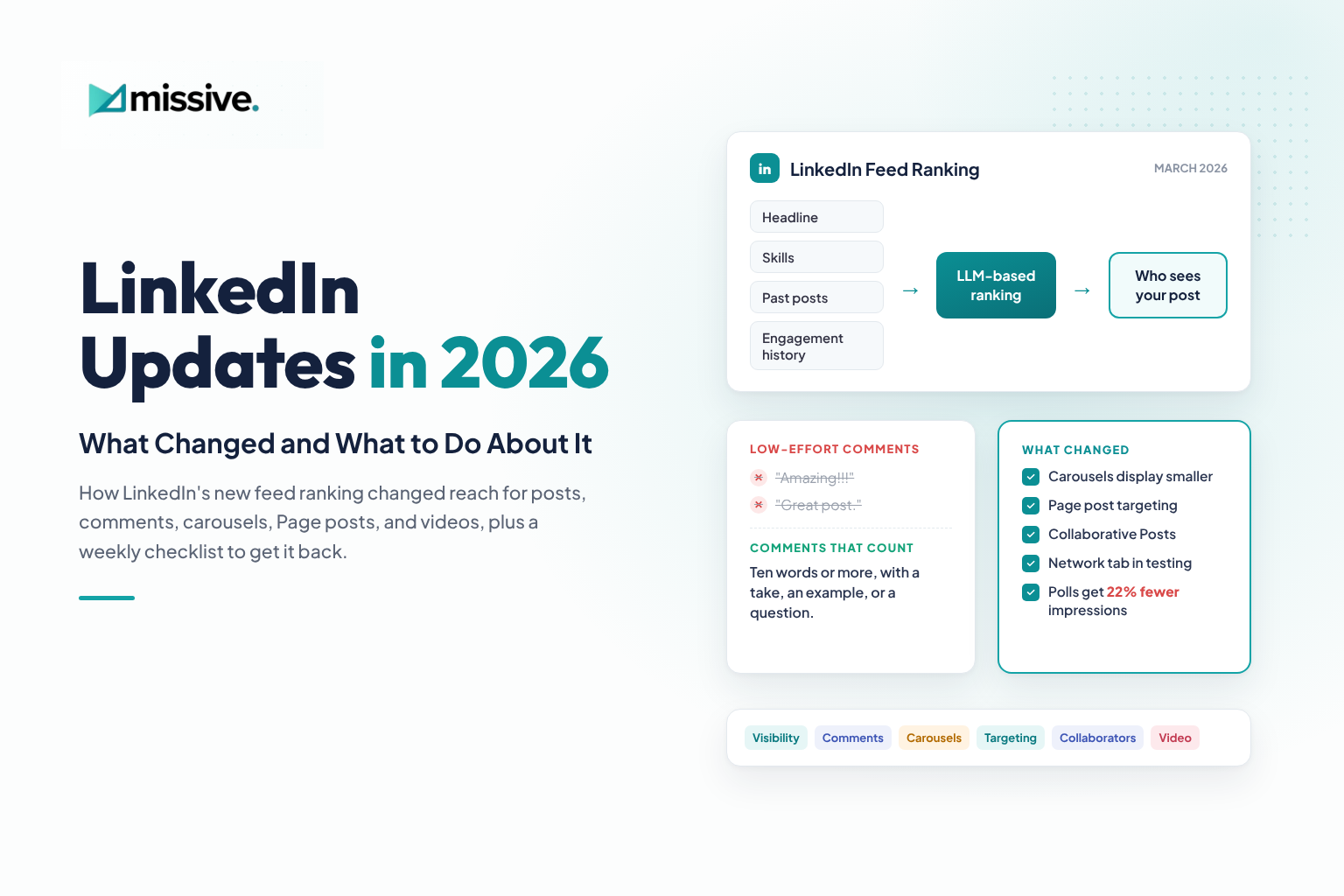
- LinkedIn rebuilt its feed in March 2026 around large language models that read your profile, your skills, and your engagement history before deciding who sees a post. A headline that does not match your posts now costs you reach.
- Pick two or three topics, say them in your headline, and post inside them for at least 90 days so the feed learns what you stand for.
- One-word comments like “Superb” add little. A comment of ten words or more with a take, an example, or a question is the safer habit.
- “Comment KEYWORD” posts lost about half their reach after July 27, 2026, while genuine closing questions held steady.
- Carousels display smaller in the feed, especially on mobile. Design the first two slides as a pair, use a 4:5 canvas, and go bigger and bolder on type.
- LinkedIn Pages can target organic posts by job function, seniority, industry, company size, location, and language.
- Collaborative Posts let profiles and Pages co-author one post with up to five collaborators, publishing to all their networks at once.
- LinkedIn is testing a Network tab with posts only from people you follow or are connected to, and a new logo now covers the top of mobile videos.
- Polls never had much reach and now get 22% fewer impressions than photo posts. They work best for brands with very large followings.
- The common thread across all these updates: relevant reach beats more reach.
Introduction
Earlier this year, LinkedIn visibility dropped suddenly, for our clients and for Missive Digital. We are aggressive about LinkedIn marketing, so a drop like that was not something we could simply wait out.
We ran a quick analysis of every recent post across our own accounts and our clients’ accounts, and monitored how those posts appeared almost everywhere: in the feed, in comments, on company Pages, on desktop, and on mobile.
The pattern became clear. On March 12, 2026, LinkedIn announced a new feed ranking system built on Generative Recommenders and large language models. It reads what your post is actually about, compares it with your industry, skills, experience, and engagement history, and filters out engagement bait and automated comments. Alongside it, we found a set of updates that matter most for LinkedIn marketing and branding: how posts become visible, how comments are counted, how carousels and videos display, how Page posts can be targeted, how collaborators can co-author posts, and which formats are losing reach.
I turned four of these into short reels. This guide brings everything together in one place, with the reasoning, the fixes we use at Missive Digital, and the sources behind them, so you can audit your own LinkedIn presence in one sitting.
LinkedIn Changed Who Gets to See Your Posts
If your visibility fell suddenly, start with alignment. LinkedIn now checks three things before it decides who sees your post: what your headline says you do, the niche you consistently post in, and how your past posts and their engagement performed. When those three disagree, the system has no clear audience to send you to, so it sends you to fewer people.
So, What Is LinkedIn Checking?
LinkedIn’s own announcement says the new ranking models look at signals members choose to share, such as industry, skills, experience, and geography, together with how they engage with content over time (LinkedIn Pressroom, March 12, 2026). The LinkedIn Engineering post by Hristo Danchev explains that profile data and post history are turned into text prompts that a shared language model reads, and that its sequential ranker treats a member’s feed history as an ordered journey rather than isolated clicks.
The research foundation goes back to 360Brew, a 150-billion-parameter model LinkedIn’s Foundation AI Technologies team described in January 2025 for ranking and recommendation tasks. Practitioners still use “360Brew” as shorthand for this shift, but the current system is the March 2026 rebuild.
In plain words: LinkedIn now reads you the way a recruiter or buyer would. If your headline says “Content Strategist” and your last ten posts are about travel, productivity hacks, and AI tools, the model cannot place you.
How Do You Get Your Reach Back?
These are the four fixes from my reel, with the reasoning behind each.
| Fix | What to do | Why it works |
|---|---|---|
| Update your headline | Say exactly what you post about and for whom, e.g. "SEO and AI search strategist for SaaS and fintech brands." | Himani Kankaria: the headline is the first text the model reads about you, so it should name your topics, not just your title. |
| Stay consistent within your niche | Choose two or three topics and post inside them for at least 90 days. | Richard van der Blom's 2026 Algorithm Insights research describes "topic fingerprinting," where steady topics teach the feed who you are. |
| Match every post to your profile positioning | Before publishing, ask: would someone reading my headline expect this post from me? | Himani Kankaria: a post outside your stated expertise has no obvious audience, so it gets tested on fewer people. |
| Sound like you, not AI | Use your own examples, client stories, numbers, and opinions. Edit any AI draft until it reads like you talking. | LinkedIn VP of Engineering Tim Jurka reports AI-slop classifiers with 94% precision on posts shown beyond your network. |
The last point matters more than it looks. In October 2026, Tim Jurka shared that LinkedIn now runs AI-slop detection on every post distributed beyond your immediate network, and LinkedIn previously reported a 40% drop in views of AI slop (Social Media Today, October 8, 2026). Generic, templated copy is now a reach risk, not just a style issue.
At Missive Digital, we apply the same principle we use for search: clear topical authority wins. If you want the website side of that thinking, our AI SEO services and CAF Framework cover how AI systems decide whom to trust and cite.
"Amazing!!!" Comments Don't Count Anymore
“Superb.” “Congrats.” “Great post.” These comments feel supportive, but they do very little for the post or for you. LinkedIn treats them as low effort, and the new feed is built to reward conversations, not reactions dressed up as comments.
What Has LinkedIn Said About Comments?
LinkedIn’s March 2026 update lists action against automated comments and inauthentic engagement as one of its four priorities. The company says it is working to make engagement pods ineffective and to curb comment automation and third-party tools that create fake conversations (LinkedIn Pressroom).
LinkedIn’s editor in chief Dan Roth has also said the platform rewards meaningful comments over replies like “great!” or “so true!”, looks at whether the commenter belongs to a relevant professional community, and treats a creator’s replies as a sign that a real conversation is happening (summarized by Taplio).
The scale of the problem explains the crackdown. Richard van der Blom, whose 2026 Algorithm Insights Report analyzed about 1.3 million posts, estimates that roughly 80% of the comments he receives in the first few minutes of a post are AI-written (Creator Science podcast, June 2, 2026).
What counts, then, is depth and relevance, not volume. A short thread with real back-and-forth tells LinkedIn more than a long list of one-word replies.
How Do You Write a Comment That Counts?
The rule of thumb I share with clients: ten words or more, with a real thought. LinkedIn has not published a word count, so treat ten words as a floor that forces substance, not a magic number. Then add one of these three:
| Comment move | Example | Why it works |
|---|---|---|
| Add your take | "I'd add that headline changes took about three weeks to show up in our reach data." | Himani Kankaria: a take shows expertise and gives the author something to reply to. |
| Share an example | "We saw this with a fintech client: fewer posts, tighter topics, and impressions from the right job titles went up." | Dan Roth (LinkedIn): comments from people in a relevant professional community carry more weight. |
| Ask a question | "Did you see a difference between document posts and video after the March update?" | Himani Kankaria: questions open a thread, and creator replies signal an active conversation. |
One solid comment beats ten “Amazing!!!” comments. It also builds your own visibility, because your comments sit in front of the author’s audience with your headline attached. That is one more reason the headline fix from the previous section matters.
At Missive Digital, we treat comments the way we treat content: every line should earn its place. Our content writing services apply the same standard to long-form work.
Why Did "Comment KEYWORD" Posts Lose Half Their Reach?
The flip side of comment quality is comment bait. MagicPost compared 687,000 LinkedIn posts with each creator’s own average post. From July 27, 2026, posts ending with “Comment KEYWORD” went from 10% above average reach to 47% below. Softer requests like “let me know in the comments” or a pointing emoji dropped from 2% below to 19% below (MagicPost, October 2026).
A genuine closing question did not lose reach. That matches LinkedIn’s March 2026 statement that it would reduce engagement bait such as “comment to agree” prompts (LinkedIn Pressroom).
So if you offer a checklist, template, or audit, stop asking people to type a keyword. Here is what we are testing instead:
| Instead of | Try | Why it works |
|---|---|---|
| "Comment 'GUIDE' and I'll send it" | End with a real question about the topic, and put the resource in your Featured section. | MagicPost data shows closing questions held their reach after July 27. |
| "Drop a 🔥 if you agree" | Ask for one specific experience: "What changed in your reach after March?" | Himani Kankaria: a specific question invites the ten-word comments LinkedIn values. |
| A keyword gate on every post | Use a keyword offer rarely, on posts where the resource is the whole point. | Himani Kankaria: keep the giveaway, lose the habit. Your audience notices the pattern before the algorithm does. |
Try it right now: think about the last comment you left. What would you change to make it ten words or more with a real thought?
LinkedIn Carousels Just Got Smaller, Especially on Mobile
If your carousels suddenly look tiny in the feed, you are not imagining it. In the current LinkedIn experience I am seeing, slides one and two appear side by side as one block, so each slide gets roughly half the width it used to. A slide designed to be read on its own now competes with its neighbor before anyone swipes.
What Changed With Carousels?
A “carousel” on LinkedIn is a document post. LinkedIn switched off its native multi-image carousel for organic posts in December 2023, and since then a carousel means uploading a multi-page PDF, PPT, PPTX, DOC, or DOCX that the feed renders as swipeable pages (FrameOS, citing LinkedIn Help). Documents can run up to 300 pages and 100 MB.
The format still earns attention. Socialinsider’s figures for company Pages put document carousels at a 6.60% engagement rate in Q2 2026, behind multi-image posts at 6.90% and ahead of single images at 5.20% (SlideDrift, citing Socialinsider). The opportunity is intact. The display is what moved.
How Do You Design for Smaller Slides?
Here are the four design changes from my reel, plus why each one helps.
| Design change | What to do | Why it works |
|---|---|---|
| Design your hook as a pair | Put the headline on slide one and the supporting line on slide two, so the pair reads as one statement. | Himani Kankaria: if both slides show together, design them together. The first impression is now two slides, not one. |
| Keep it short | Test three-slide carousels against your usual length. | Himani Kankaria: smaller slides make long decks harder to follow. Many guides still suggest 6 to 10 slides, so run it as an experiment and compare page-view depth. |
| Use a 4:5 canvas | Design at 1080 x 1350 px. | Oktopost lists 4:5 portrait as a recommended document size, and portrait pages use more vertical space in a narrow block. |
| Go bigger and bolder | Push headings up to around 38 pt, use fewer words, and raise color contrast. | Himani Kankaria: half-width slides need type that survives a phone screen. ScreenSnap notes body text under 24 pt is already hard to read on mobile. |
Use LinkedIn’s document analytics to judge the test. The page-view depth metric tells you whether people swipe past the opening pair or stop there.
The same visual discipline applies to every piece of content we audit. If your blog posts, decks, and lead magnets also need a readability check, our Content QA Checklist is a good place to start.
Save this section before you design your next carousel.
Your LinkedIn Page Posts Can Pick Their Audience
Does all your content have the same audience? Probably not. So why show every company Page post to every follower? LinkedIn Pages let you target organic posts, and with a feed that now rewards relevance, this is one of the most underused settings I see on client Pages.
Which Filters Can You Use?
According to LinkedIn Help, super admins and content admins can target Page posts using followers’ profile data: organization size, industry, function, seniority, geography, and language.
A few rules to know before you start:
- The targeted audience must include at least 300 Page followers.
- Targeted posts are actively shown only to followers who match the criteria, on their homepage feed and on your Page.
- People outside the criteria can still find the post if it is shared or reposted.
- Employees cannot be notified of a targeted post.
To set it up, start a post from your Page admin view, open the visibility dropdown, choose Targeted Audience, add your criteria, check the estimated audience, and post. If the estimate is too small, remove a filter to widen it.
When Should You Target, and When Shouldn't You?
Targeting works best when the post is clearly built for one segment. Use the question from my reel before every Page post: who is this actually for?
| Post type | Target | Why it works |
|---|---|---|
| Event or meetup in Mumbai | Geography: Mumbai | Himani Kankaria: people who cannot attend scroll past, which tells the feed the post is not relevant. |
| Product update for CFOs | Function: Finance; Seniority: Director and above | Himani Kankaria: a narrow, relevant audience is more likely to save, comment, and click. |
| Hiring for entry-level roles | Seniority: Entry, Training | Himani Kankaria: senior followers are not the audience, and the post reaches the people it is for. |
| Industry-specific case study | Industry: e.g. healthcare or fintech | Oktopost recommends clear, specific targeting criteria so relevance is not diluted across a multi-industry Page. |
| Brand news, culture, or thought leadership | No targeting | Himani Kankaria: content for everyone should reach everyone. Over-targeting shrinks reach without improving relevance. |
Relevant reach is always better than more reach. It also gives you cleaner data: when a targeted post performs well, you know which segment it worked for.
If you serve several industries from one Page, map your content pillars to segments first. Our industry pages for healthcare, fintech, SaaS, and telecom show how we split strategy by audience, and our content consulting work covers this kind of planning.
Have you tried Page post targeting yet? I would love to hear whether it is working for you.
You Can Now Co-Author Posts With Collaborators
Collaborative Posts might be the most useful branding update LinkedIn has shipped this year. On July 23, 2026, LinkedIn began expanding the feature globally to members and Company Pages, so a Page can co-author posts with customers, partners, or creators (LinkedIn Pressroom).
How Do Collaborative Posts Work?
You start a post, tap Add collaborators, and invite up to five people or Pages. Once they accept, every collaborator is listed on the post and it publishes to all their networks at once (Louise Brogan). A few details worth knowing:
- It works with most formats: text, images, videos, documents, links, polls, and events. The post must be public, and only the original creator can edit it or manage collaborators (European Sealing Association).
- Individual collaborators who accept see full engagement metrics. Page admins see the post in Page analytics but not the engagement data from a personal post.
- Rollout is gradual, and you can only add people who also have the feature.
- To accept invites as a Page, a super admin needs to turn on collaborations under Me, Settings, Notifications, Collaborations (Buffer).
How Should Brands Use Collaborative Posts?
The real win is combining a Page’s credibility with a person’s reach. Metricool’s 2026 study found personal profiles see a 63% higher engagement rate than company Pages (Social Savvy, citing Metricool).
| Use case | Who co-authors | Why it works |
|---|---|---|
| Product or feature launch | Company Page + founder or product lead | Himani Kankaria: one post, one conversation, instead of two versions of the same news competing in the feed. |
| Client case study | Agency Page + client lead + client Page | Himani Kankaria: proof lands harder when the client puts their name on it. |
| Webinar or event | Your Page + co-hosts and speakers | Himani Kankaria: each speaker brings their own relevant audience, which fits LinkedIn's interest-based feed. |
| Partner or creator campaign | Brand Page + creator | LinkedIn positions the feature for brand partnerships and teaming up with creators. |
One caution that ties back to the first section: pick collaborators whose niche matches yours. A collaboration outside your positioning blurs the signal you have spent months building.
LinkedIn Is Testing a Feed Just for Your Network
On September 18, 2026, LinkedIn CPO Hari Srinivasan announced a test of a Network tab that sits next to the For you feed on mobile. It shows only posts from people you have connected with or followed. LinkedIn has not shared the test size, how long it will run, or a rollout date (Leptidigital).
What Does a Network Tab Mean for Your Brand?
It is a test, and LinkedIn’s earlier alternative feeds never launched broadly (Social Media Today). Still, it tells us where LinkedIn’s head is: real connections between real people.
- Followers you actually earned matter again. If the tab rolls out, accounts that rely purely on algorithmic reach to strangers lose a surface. Accounts with an engaged following gain one.
- Pages may be left out. Srinivasan’s announcement mentions people, not Pages. Until LinkedIn clarifies, it is one more reason to pair your Page with employee and founder voices, and Collaborative Posts make that easy.
- No need to rebuild your strategy yet. Keep building topical authority. It works in both feeds.
LinkedIn Videos Lost Some Screen Space on Mobile
If you post reels or vertical videos on LinkedIn, check your templates. In October 2026, a new LinkedIn logo started covering roughly the top 15% of mobile videos. Creator Heike Young mapped every overlay: the back arrow and logo at the top, a play button in the center for people with autoplay off, reaction and share icons down the right side, and the author name and caption across the bottom (Influent).
How Do You Keep Faces and Captions Visible?
- Keep your face and key on-screen text in the center-left of the frame, away from the right-side icons.
- Start hook text below the top 15% so the logo does not cover it.
- Keep burned-in captions above the bottom band where the author name and caption sit.
- Preview every video on a phone before posting, not just in your editing tool.
Treat this as a template change, not a one-off fix. Update your reel template once and every future video benefits.
Polls Were Never Built for Reach
Honestly, polls never had much visibility to begin with. In my experience, they work for brands with millions of followers, where even a small share of the audience adds up to a meaningful sample. For most brands and personal profiles, a poll gets a few votes and very little conversation.
The data now backs that up. MagicPost found that since mid-May 2026, a poll gets 22% fewer impressions than the same creator’s average photo post, down from 9% more earlier in the year (MagicPost).
What Should You Post Instead of a Poll?
If you want audience input, ask the question in a regular post with your own take first, then end with a genuine closing question. You get the answer, plus comments with real reasoning, which is the engagement LinkedIn now rewards. Save polls for large audiences or for quick internal checks where the votes themselves are the point.
Your Weekly LinkedIn Checklist
Each update rewards the same thing: content that clearly belongs to a specific person or brand and reaches the people it was made for. This checklist turns the sections above into a routine you can run in about 20 minutes a week.
Before You Post
☐ My headline names the two or three topics this post belongs to.
☐ This post fits the niche I have been posting in for the last 90 days.
☐ The draft includes something only I could write: a client story, a number, an opinion, or a mistake.
☐ The last line is a genuine question, not a “Comment KEYWORD” request.
☐ If it is a carousel, slides one and two work as a pair, the canvas is 4:5, and headings are large and high-contrast.
☐ If it is a video, faces and text sit inside the mobile safe zone.
☐ If a partner, client, or teammate is part of the story, I invited them as a collaborator.
☐ If it is a Page post, I have answered “who is this for?” and set targeting when the answer is one segment.
After You Post
☐ I replied to early comments with more than “thanks.”
☐ I left a few comments of ten words or more on posts in my niche, each with a take, an example, or a question.
☐ I checked impressions by job title and industry, not just total impressions.
☐ For carousels, I noted page-view depth to see where people stopped.
If you want your LinkedIn content and your website content to support each other, this is where the two meet. The topical authority you build on LinkedIn mirrors what we build for search through our SEO services, and our content audit services can show where your positioning is inconsistent across channels.
Relevant Reach Is the New Reach
LinkedIn’s 2026 changes look like separate updates, but they point in one direction. Your profile tells the feed who you are. Your comments show whether you add to conversations. Your carousels and videos have to work in a smaller frame. Your Page can speak to the exact people a post is for, and collaborators can carry it into networks you could not reach alone.
None of this needs a hack. It needs clarity, consistency, and proof that a real person with real experience is behind the content.
Ready to Put This Into Action?
Do it yourself: Download the LinkedIn Weekly Checklist. It covers every update in this guide, from headline alignment and comment habits to carousel sizes, video safe zones, collaborators, and Page targeting, in one page you can run every week.
Or let us do it for you: If your founders or top management should be visible on LinkedIn but do not have the time, our LinkedIn marketing team can build and run their presence: profile positioning, content in their own voice, collaborative posts with your Page, and monthly reporting on reach from the right audience. Book a 30-minute call to see if it is a fit.
FAQs
The most common reason is a mismatch between your headline, your niche, and your recent posts. Since March 2026, LinkedIn's ranking models read your industry, skills, experience, and engagement history before deciding who sees a post. Rewrite your headline around two or three topics and post inside them consistently.
LinkedIn says its new ranking looks at signals members share, including industry, skills, and experience, alongside how they engage over time. Your headline is one of the most visible of those signals, so it should name what you actually post about.
Very little. LinkedIn has said it rewards meaningful comments from relevant people and is acting against automated comments and engagement pods. Aim for ten words or more with a take, an example, or a question.
LinkedIn has not published a word count. Ten words or more is a practical floor because it forces you to add a real thought. The substance matters more than the length.
They lost a lot of reach. MagicPost's study of 687,000 posts found "Comment KEYWORD" posts dropped from 10% above their author's average reach to 47% below after July 27, 2026. A genuine closing question did not lose reach.
In the current feed, the first two pages of a document post can appear side by side as one block, so each slide displays at about half its earlier width. Design slides one and two as a pair, use a 4:5 canvas, and enlarge your headings.
A 4:5 portrait canvas at 1080 x 1350 px is a reliable default for document posts. Keep every page the same size and export as a PDF so the layout does not shift.
Yes. Page super admins and content admins can target posts by organization size, industry, job function, seniority, geography, and language. The targeted audience must include at least 300 Page followers.
Start a post, tap Add collaborators, and invite up to five people or Pages. They need to accept, and they also need access to the feature, which is still rolling out gradually.
It is a test announced on September 18, 2026: a tab next to the For you feed that shows only posts from people you are connected to or follow. LinkedIn has not announced a rollout date.
Keep faces and text away from the top 15% of the frame, where a LinkedIn logo now sits, the right-side icon column, the center play button, and the bottom band with the author name and caption.
For most accounts, no. Polls never had much visibility, and since mid-May 2026 they get 22% fewer impressions than a creator's average photo post. They work best for brands with very large followings.
Generic AI content is at risk. LinkedIn says its AI-slop classifiers now cover posts distributed beyond your immediate network with 94% precision, and it reported a 40% reduction in views of AI slop. Use AI as a draft tool, then add your own experience and voice.
360Brew is a 150-billion-parameter foundation model for ranking and recommendation that LinkedIn researchers described in January 2025. Many marketers use the name as shorthand for LinkedIn's shift to LLM-based ranking, which LinkedIn rolled out in its March 2026 feed rebuild.